Medical EMR · practice system · Dion AI

Chart it once. Run the whole clinic on it.

The EMR and practice system for airway & sleep, ENT, primary care, med spa and specialty clinics — problems, meds and vitals, care plans, the schedule, forms and billing on one record, with Dion AI on every screen.

Plan the care. Prepare the visit. Document the encounter. Keep the next step visible.

Access by request · Invited to a team? · Sign in →

Illustrative preview · fictional patients

Dion Clinical for medical practices is an EMR and practice management system for airway and sleep, ENT, primary care, med spa and specialty clinics that keeps problems, medications, vitals, care plans, scheduling, forms and billing on one patient record, with AI that drafts and proposes while the clinician makes every clinical decision.

One record
chart · schedule · forms · billing
Say it · tap once
the AI proposes, a person commits
Superbill on signature
ICD-10-CM + CPT proposed from the note

Why it exists

The work around the visit, done before you ask.

Not another program to learn. The note, the codes, the forms and the next booking arrive done; your people decide.

  • “Charting eats the evening.”

    The scribe drafts while you talk and saves every few seconds. You sign before the patient leaves.

  • “The superbill is rebuilt by hand after every visit.”

    Signing the note issues it from your own templates, with ICD-10-CM and CPT proposed from what was said.

  • “Intake is a clipboard, then a retype.”

    Forms go out at booking, remind the patient twice and land on the chart.

  • “Every clinic keeps its own calendar.”

    One clinic or all of them, on one board.

The record should not just tell you what happened. It should help the team see what needs to happen next.

Before the patient sits down

Every visit, ready before the room.

A missing consent shouldn’t be found with the patient already in the room. Every visit on the schedule is checked against what it needs, and the day shows which visits are ready and which need someone first.

Today’s visits1 ready · 3 need someone
  1. 8:00Annual physicalA. Brooks ReadyEverything checked is on file.
  2. 9:00Sleep consultD. Kim Needs attentionInsurance not on file.
  3. 10:30New patient examR. Okafor Needs attentionMedical history and allergies not returned.
  4. 11:30NeuromodulatorL. Moreau BlockedTreatment consent not signed. Treatment light is red.
Illustrative day · fictional patients

What each visit is checked for

Consents for this visit
Resolved from what is booked on the visit, so a consent owed for some later step does not hold up today.
Financial policy
A signed financial policy or care-plan agreement on file.
Medical and allergy history
Returned and on the chart. An allergy history nobody has taken is a visible gap, never a blank that reads as none.
Insurance
On file before the patient is roomed.

Each gap names what is missing and who closes it. A clinic can switch on a daily check that files each gap as a task for that role, and a hold so treatment does not start while a required consent is unsigned.

A check that could not be read shows as “could not check”, never as ready. Other dependencies, such as an outside clearance letter, stay with your team’s own process.

The course of care

One record for the whole course of care.

The record runs across visits. Findings, the plan, each visit’s readiness, the note and what comes next stay connected, rather than appointment notes piled on one another.

  1. 01

    Problems

    Problems, medications and allergies as structured records, each with its source.

  2. 02

    Care plan

    Care plan, consents and deposit signed together.

  3. 03

    Ready

    The visit checked for consents, history and insurance.

  4. 04

    The visit

    Guided visit wizards; the scribe drafts the note and the provider signs it.

  5. 05

    Next step

    The note’s next visit becomes a booking task; referrals stay tracked.

Each plan item carries its state:plannedscheduledin progresscompletedreferred

The visit

The chart should work at the speed of the appointment.

Open the patient and the history, the plan and what is due are already in context. Treat, capture the findings, let the note catch up, and set the next step before the patient leaves.

The note writes itself, saved while you talk.

Ambient capture in the exam room becomes a structured note with ICD-10-CM and CPT proposed from what was said — drafted, never signed until you say so. It saves as it goes, and a recording that never became a note is flagged on the chart.

  1. Record the visit
  2. Draft note, codes proposed
  3. Clinician edits
  4. Author signs
  5. Later changes are addenda
AI drafts · the clinician owns the record

Dion AI on every screen.

Say what the visit needs — a task for the front desk, plan items, a follow-up, a letter. It answers with cards; tap “Do it” and each one lands through the same path a person would use.

The problem list leads.

Problems, medications and allergies are structured records with provenance. Visits run as guided wizards that compile the note, and outside records arrive on the chart.

Injectables to the unit, site and lot.

Seven aesthetic modalities on a per-muscle face map. Stock is lot-traced with expiry; expired or over-drawn product is refused, and filler carries a hyaluronidase gate.

Sign the note. The superbill is made.

Signing issues the superbill from your own templates — billing entity, modifiers, units and NDC — and files the visit summary. Medical 837P claims and a real ledger.

The product

Real screens, invented patients.

clinical.dionhealth.com/app/patients/…/medical
BP124/78HR66SpO₂98%BMI27.4
Obstructive sleep apneaG47.33
Chronic rhinosinusitisJ32.9
Essential hypertensionI10
MedsLisinopril 10 mg · Fluticasone spray⚠ Penicillin allergy

The chart

Problems, meds and vitals up front.

Structured, with provenance — an allergy history nobody has taken is a visible gap, never a silent blank. Outside records from hospitals and physician EMRs arrive on the chart, and several filed documents compile into one care report.

Dion
Keeps every entry’s source beside it and shows what has never been asked.
You
Confirm, correct, and decide what goes on the problem list.
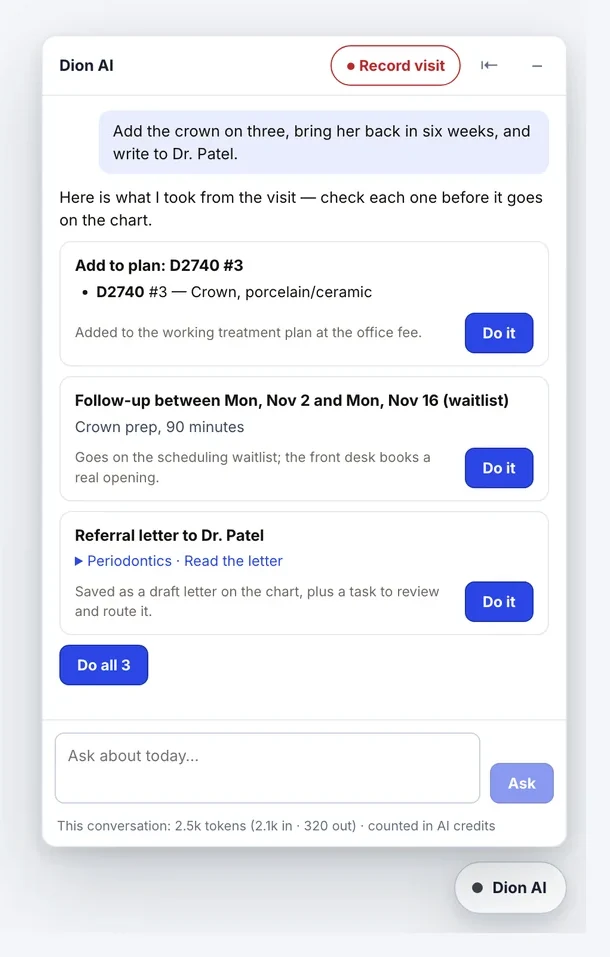
clinical.dionhealth.com/app · Dion AI
The Dion AI panel: one sentence becomes a plan item, a follow-up and a referral letter, each with a Do it button

Dion AI

One sentence, three cards, one tap each.

Say what the visit needs. Each card lands through the same path a person would use — a task, a waitlist entry, a drafted referral letter.

Dion
Turns the sentence into cards and checks each one again before it commits.
You
Tap “Do it”. A follow-up joins the waitlist — it never books a room — and nothing reaches a patient until someone taps send.
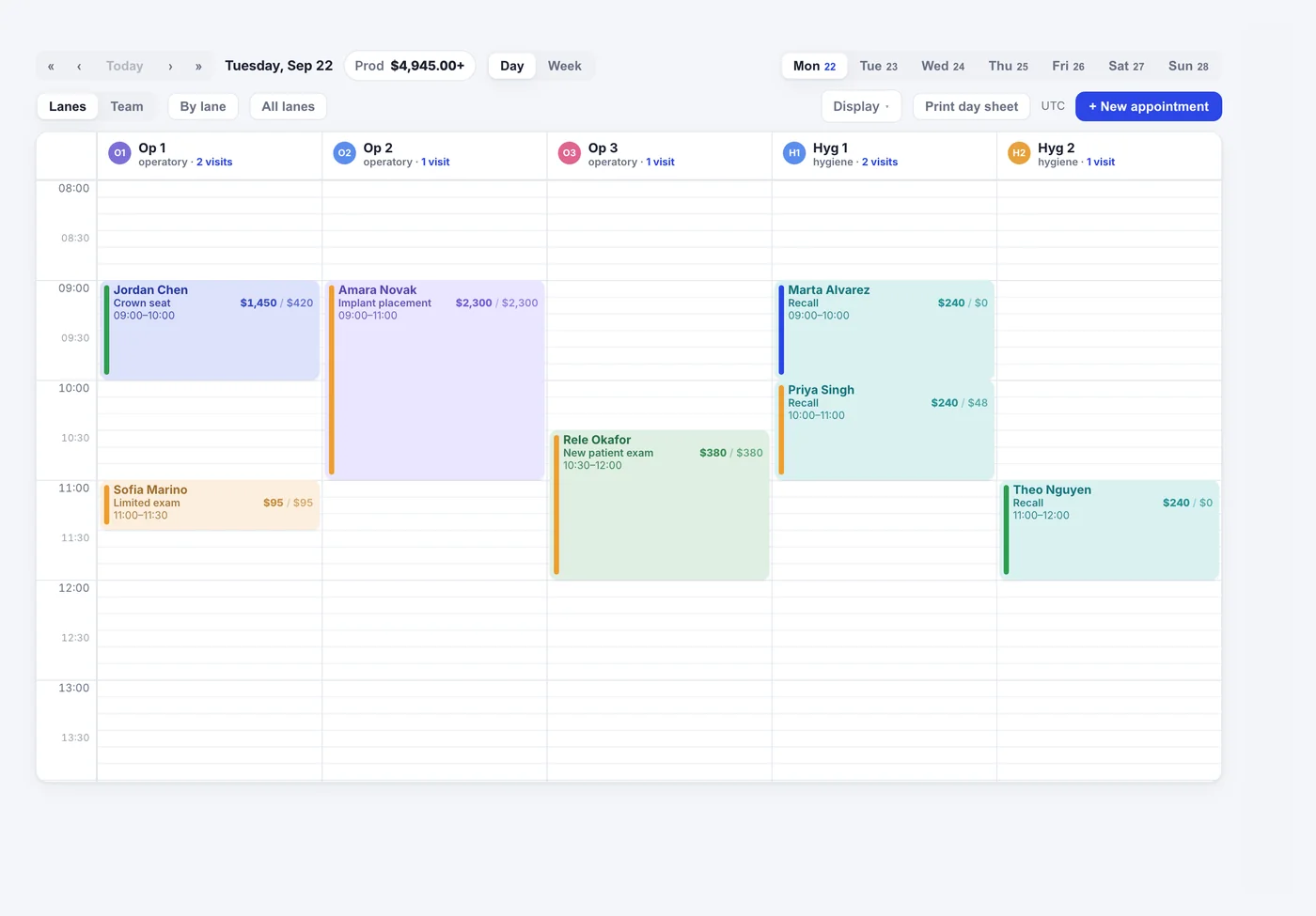
clinical.dionhealth.com/app/schedule
The schedule board — lanes, visit types by colour, and production on every block

Schedule & check-in

Every room, every clinic, one board.

Day, week or month; one clinic or all of them. Forms go out at booking and remind the patient twice; the check-in wizard runs on a paired tablet or at the desk.

Dion
Hands the tablet only the forms still owed, and turns the note’s next visit into a scheduling task.
You
The front desk marks arrival and books the visit.
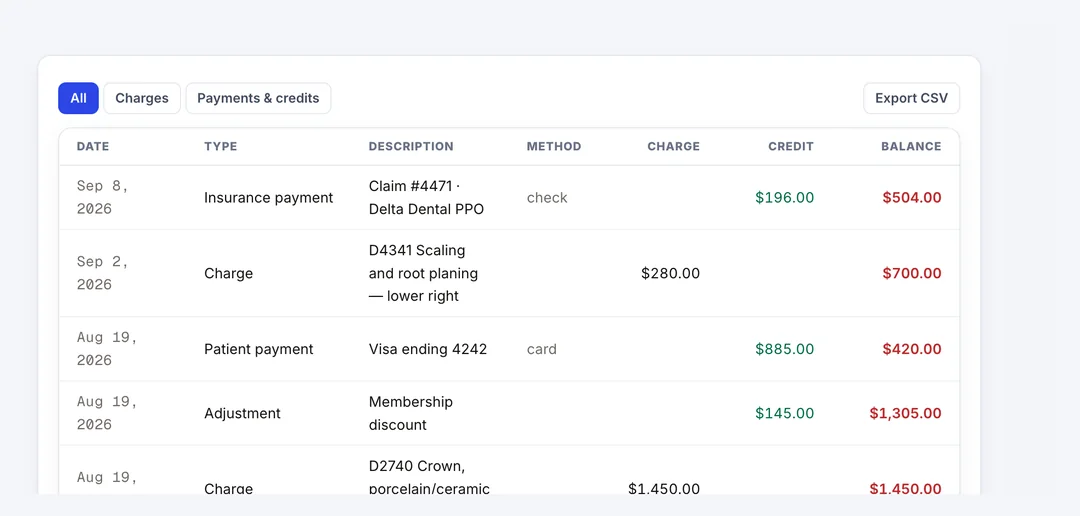
clinical.dionhealth.com/app/patients/…/financial
The patient ledger — charges, adjustments, payments and a running balance

Ledger

Charges, payments and a running balance.

Insurance and patient payments post to one ledger per patient, with checkout at the end of the visit.

Dion
Issues the superbill from the signed note — billing entity, modifiers, units and NDC from your templates.
You
Checkout: collect, adjust, post.

A day on it

One patient, one morning, one record.

An illustrative day. The times are made up; every step is something the product does now.

  1. Before 8:00

    The forms are already in.

    DionSent them at booking and reminded the patient twice.

    YouNothing — unless something is still owed.

  2. 8:55

    Check-in.

    DionThe wizard hands the paired tablet only the forms still missing.

    YouThe front desk marks the patient arrived.

  3. 9:02

    In the room. ● Record visit.

    DionThe scribe listens and drafts the structured note, autosaving as it goes.

    YouLook at the patient.

  4. 9:30

    The note, coded.

    DionProposes ICD-10-CM and CPT. On signature it issues the superbill from your templates and files the visit summary.

    YouRead, edit, sign. Only the author signs; a signed note is addended, never rewritten.

  5. 9:36

    “See her in two weeks.”

    DionDion AI turns the sentence into a follow-up card; the follow-up joins the waitlist.

    YouTap once. Care plan, consents and deposit are signed together.

  6. 11:15

    Injectables, to the lot.

    DionRecords the unit, site and lot, and refuses expired or over-drawn product.

    YouThe provider treats and charts to the face map.

  7. End of day

    What is left, in order.

    DionUnsigned notes oldest first, and referrals with the date they were last chased.

    YouClear the short list, then go home.

Where it fits

Each app asks one question. Clinical keeps the record.

Clinical owns the record. Dion Desk owns the conversation with the patient; Dion Pay owns payments and payment plans.

AppThe question it answersWith Dion Clinical

Dion Clinical

What care is planned, what happened today, what must be ready next, and is the record complete?

The clinical record, and the workflow through which care is delivered.

Patient Engagement

What follow-up does this patient need?

Clinical records the state: overdue recare, accepted treatment with no appointment. Patient Engagement runs the outreach, inside limits the practice sets.

MedicalDentalRCM

What does this visit need to be billed and paid?

Clinical hands over the signed visit’s superbill and insurance packet. Claims, remittances, denials and payer follow-up are MedicalDentalRCM’s.

Part of Dion

Works with the rest of Dion.

One sign-in and one patient identity across the suite. Here is what moves each way, and what you see because of it.

Dion Clinical is part of Dion Health. It works with Dion Desk for the front desk, MedicalDentalRCM for insurance billing, and Patient Engagement for the patient portal.

AppInto the chartOut of the chart

Dion console

InOne sign-in: launch Clinical from the Dion console and land already signed in.

OutThe console’s work board shows Clinical’s open tasks, referrals in flight and unsigned notes beside every other app’s queue.

Dion Desk

InAppointments booked or changed at the front desk land on the schedule and the chart at once.

OutForms links, approved care reports and patient messages Clinical prepares are delivered by Desk, which reports back what was sent.

Dion MDRCM

InClaim status comes back to the chart: payments post to the ledger, and a denial goes straight onto the denial worklist.

OutOvernight eligibility checks for upcoming visits; each signed visit’s insurance packet goes to the billing team once your practice is connected.

Patient Engagement

InDelivery status of every message comes back to the chart.

OutThe patient’s own record feeds their portal.

Dion Pay

InThe balance a patient owes across the suite shows beside the practice’s own ledger.

Out—

Dion Membership

InWhether a membership is in force shows on the chart.

Out—

Dion Workforce

InStaff licences and certifications feed the daily compliance board.

Out—

Switching

No big-bang PMS conversion.

A practice can start with other Dion apps while its current practice system stays in place. Moving onto Dion Clinical is a later decision, made on your schedule: records come across from the systems it supports, and the old system keeps running until your team signs off.

01

Request access

An owner submits the practice's EIN, NPIs and state license. An onboarding agent collects the rest in a short conversation.

02

Get approved

Dion verifies the credentials and approves the practice. Your workspace, owner profile and first location are set up automatically.

03

Bring your team and your data

Each teammate joins by email invite into onboarding shaped to their role. Records are imported from the systems Dion Clinical supports, and the old system runs alongside until you switch.

Safety & clinician control

AI supports the workflow. The clinician stays responsible.

Clinical judgment stays with the clinician.
Diagnosis, treatment planning, interpretation, the choice of procedure, the consent conversation, the final note and follow-up decisions belong to the licensed clinician. Dion Clinical drafts, checks and reminds. It does not diagnose, and nothing joins a plan until a person adds or accepts it.
The AI proposes. A person commits.
Every Dion AI card waits for a tap before anything is saved.
Only the author signs.
Assistants record for the doctor. A scribe note is a draft until its author signs it, and a signed note is addended, never deleted.
Nothing reaches a patient on its own.
A message the AI drafts becomes a front-desk task holding the words. Someone taps send.
Imaging is decision support.
3-D views and measurements to support the clinician, who reviews every study and issues the report.
Every read is on the record.
Each read and change of patient information is written to an audit log; sign-in supports MFA; each practice’s data is isolated from every other’s.

One office or many

Built for a clinic and for groups.

Every office in one account
Each office keeps its own chairs, hours and providers, on one patient record.
One office or all of them
The schedule, the day board and patient flow show one office or every office together. Booking from the all-offices view asks which office.
Automation, office by office
Hold automatic outreach for one office — while its old system is still texting — and keep it running everywhere else.
Every practice on one console
The Dion console’s work board reads the queues of every practice you run, beside the other Dion apps.
Each role, its own work
Teammates join by invite into onboarding and worklists shaped to their role.

Who it’s for

Each role opens its own work.

Every teammate joins by invite into onboarding shaped to what they actually do.

Physicians & providers
The problem list, vitals, the scribe and the care plan on one record. You sign what you wrote.
Medical assistants
Guided visit wizards, vitals, and recording the visit for the provider — never signing for them.
Front desk
The day board, check-in, forms that chase themselves, and booking tasks the note already wrote.
Practice managers
Worklists for pending notes, insurance verification, referrals and the day’s open items.
Owners
Every clinic on one board, with production on every block.

What runs on its own

15+ jobs that run without being asked.

Work that runs on a schedule or the moment something happens. Rows marked switch on stay off until a manager turns them on; nothing on this list signs a note or moves money.

  • Continuously

    The rest of Dion kept in step

    Signed notes, consents, visits and chart changes reach the other Dion apps without anyone re-entering them.

  • Through the day

    Insurance packets

    After a superbill is issued, the necessity letter and packet are prepared and sent to Dion MDRCM when your practice is connected.

  • Overnight

    Eligibility checks

    Upcoming visits get their insurance checked through Dion MDRCM, and verified benefits feed the estimate.

  • Before the huddle

    Morning briefingswitch on

    A ranked list of who needs attention today, and why. Suggested work arrives as proposals.

  • Daily

    Missing forms and visit paperworkswitch on

    Upcoming visits missing history, insurance, the financial policy or a required consent get one link for Desk to deliver.

  • Daily

    Recall outreachswitch on

    Patients overdue for recare are handed to Patient Engagement, inside the limits you set.

  • Daily

    Unscheduled treatmentswitch on

    Treatment still waiting to be booked is shared with Patient Engagement’s care-gap list.

  • Daily

    Daily compliance checkswitch on

    The day’s schedule is checked before procedures, and each gap becomes a task for whoever closes it.

  • Daily

    Task escalation

    Overdue tasks move up: higher priority and more eyes on them.

  • Daily

    Recordings that never became a note

    Any recorded visit left without a note becomes a high-priority task.

  • Overnight

    Chart kept true to the notes

    The structured chart is brought into line with what the notes say — as proposals, or applied when you switch that on.

  • When a note is signed

    Superbill and visit summary

    The superbill is issued, the visit summary filed and the insurance packet started.

  • When a note is saved

    Tasks from the note

    Action items and the next visit become tasks on the day board.

  • When a form comes back

    Patient forms to the chartswitch on

    History and insurance answers land on the chart as patient-reported, for the clinician to confirm.

  • When a claim moves

    Claims from Dion MDRCM

    Payments post to the ledger; a denial goes onto the denial worklist.

AI-enhanced or autonomous

You choose how far the AI goes.

Each workflow starts in assist. Where the product can finish the job on its own, a manager switches it on for the practice, inside the limits below. Three acts are never the AI’s under any switch: signing, contacting a patient from a chart update, and billing.

  • The visit note

    The scribe drafts the note with codes while you talk, and saves as it goes.

    Only the author signs · a signed note is addended, never deleted

  • Keeping the chart true to the notes

    Changes the notes support — plan status, diagnoses, recall, the tooth chart — arrive as proposals you accept or reject.

    Every change attributed and reversible

  • What patients send back

    A submitted history waits on the chart for staff to apply.

    The clinician confirms each entry

  • Missing forms and consents

    Staff text the forms link from the chart.

    Timing and daily limits you set · hold per office

  • Recall outreach

    The recall worklist, with the calls the front desk logs.

    Who is reached and how often, set by you · hold per office

  • The day’s compliance gaps

    The dashboard’s “File tasks” button.

    Internal tasks only — it never contacts a patient

  • Insurance packets

    Send the packet from the visit’s panel.

    Letters go unsigned · a send that keeps failing waits for staff

  • Morning briefing

    A ranked list of who needs attention today, and why.

    Switch on per practice

  • Dion AI requests

    Say what the visit needs; each card lands on one tap.

    Nothing is saved without a tap

Questions

What practices ask first.

What is Dion Clinical for medical practices?

Dion Clinical is an EMR and practice management system that keeps problems, medications, vitals, care plans, scheduling, forms and billing on one patient record. It is cloud-based, so it runs in a web browser. An AI scribe drafts the visit note and Dion AI proposes tasks and follow-ups, while the clinician makes every clinical decision and signs the note.

Who is it for?

It is for airway and sleep, ENT, primary care, med spa and specialty clinics, from one clinic to groups. Physicians and providers chart and sign notes, medical assistants record vitals and the visit, the front desk runs the day board and check-in, practice managers work from worklists, and owners see every clinic on one board. See Dion Clinical for dental practices →

What does it replace in a medical clinic?

It can replace the separate programs a clinic uses for charting, scheduling, patient forms, visit notes, the superbill and the patient ledger, so the same information is not typed twice. Insurance billing, patient payments and the patient's own portal connect to the other Dion apps, and the chart shows what each one reports back.

Can we bring our patients and notes from our current system?

Yes. Dion Clinical imports a clinic's patients, visits, notes and documents, and your current system keeps running alongside until your team signs off, so the switch happens on your schedule rather than ours. Tell Dion which system you use when you request access and it will confirm what can be brought across.

How do the AI and my team split the work?

The AI drafts and proposes, and your team decides. The AI scribe drafts the visit note and proposes ICD-10-CM and CPT codes, and Dion AI turns a spoken request into cards for tasks and follow-ups. Nothing is final until a person acts: only the author signs a note, one tap commits a card, and nothing reaches a patient until someone taps send.

How is patient information protected?

Dion Clinical keeps each practice's records isolated from every other practice's and writes every read and change of patient information to an audit log. Sign-in supports multi-factor authentication. A signed note is never deleted: later changes are added as addenda, so the record shows what was written and when.

Does it work for a group with several clinics?

Yes. Dion Clinical keeps every clinic in one account, each with its own rooms, hours and providers, on one patient record. The schedule and day board show one clinic or all of them together, and automatic outreach can be held for one clinic while it keeps running at the others. Owners read the clinics separately or side by side.

How do we get started?

An owner requests access with the practice's EIN, NPIs and state licence. Dion verifies them, your workspace is set up, and teammates join by email invite. Your patients, visits, notes and documents are imported and your current system keeps running alongside until your team signs off. You can also book a walkthrough first.
A clinical record that takes part in the care.

Follow a patient from the plan to the visit’s readiness, the encounter, the signed note and the next step, on one current record for the whole clinic.