Dental EMR · practice system · Dion AI

Chart it once. Run the whole practice on it.

One patient record for charting, perio, treatment plans, the schedule, forms, imaging and billing — with Dion AI on every screen. Record the visit, say what it needs, tap once. Nothing is typed twice.

Practices join by application · Invited to a team? · Sign in →

Illustrative preview · fictional patients

One record
chart · schedule · forms · imaging · billing
Say it · tap once
the AI proposes, a person commits
CareStack · Open Dental
imported, run side by side, then switch

What Dion Clinical does

Everything in the practice, on one chart.

The note writes itself, saved while you talk.

Ambient capture in the operatory becomes a structured note with ICD-10 and CDT codes attached — drafted, never signed until you say so. It autosaves every few seconds, pauses and resumes as one visit, and a recording that never became a note is flagged on the chart.

ai-scribe // autosaves while recording · only the author signs
Dion AI on every screen.

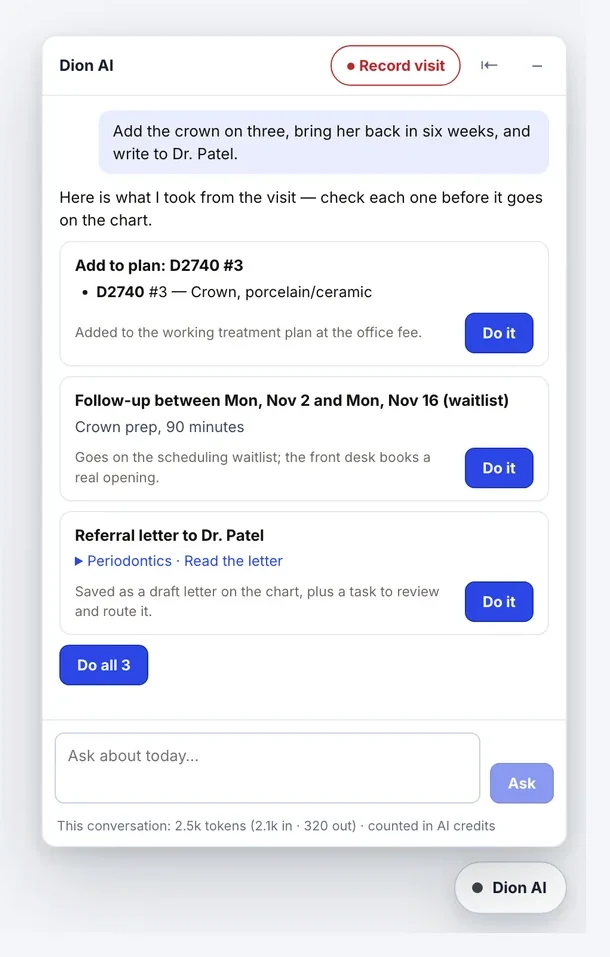
Say what the visit needs — a task for the front desk, plan items, a follow-up, a letter. It answers with cards; tap “Do it” and each one lands through the same path a person would use.

A chart that reads like the mouth.

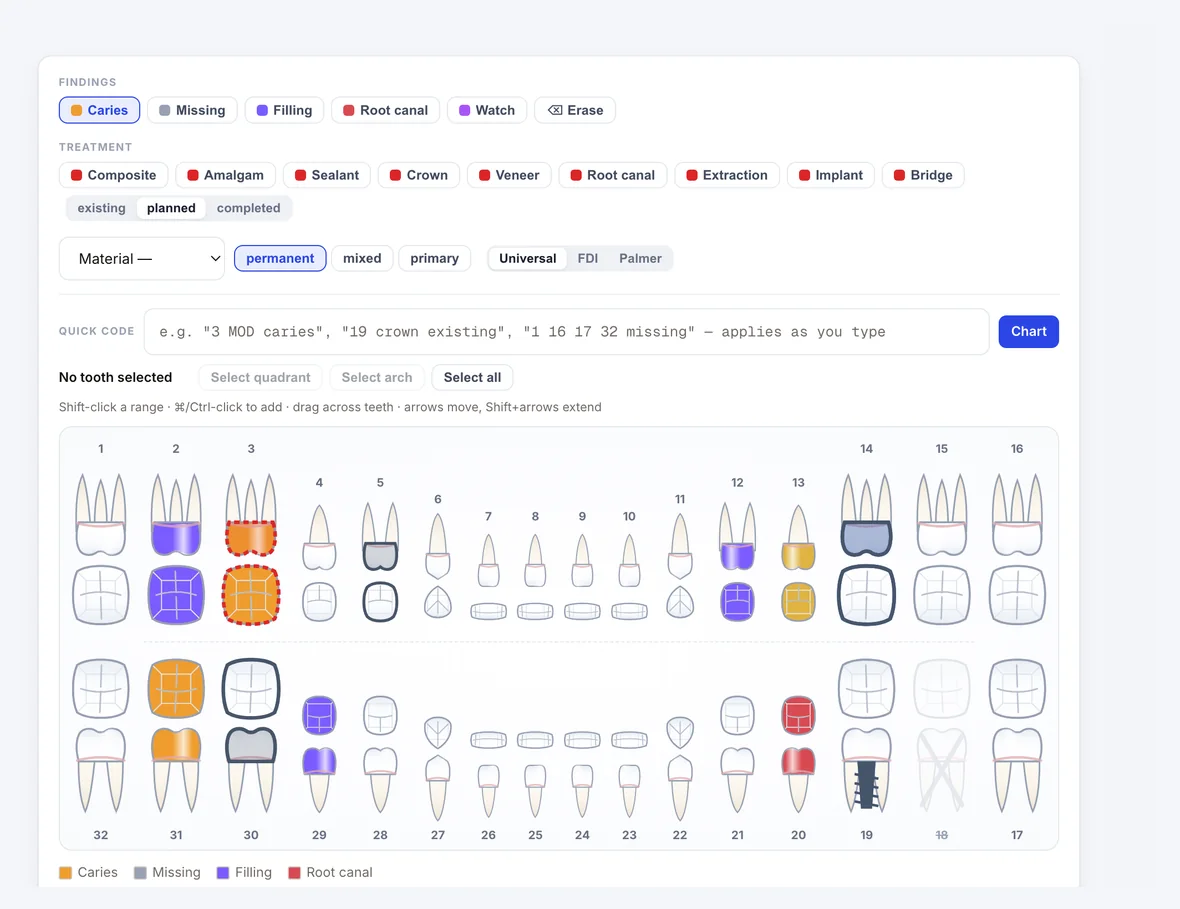
Surfaces paint with a click and every change is kept per tooth. The tooth chart is built from recorded treatment; anything the history only implies waits for a clinician.

Plans patients choose between.

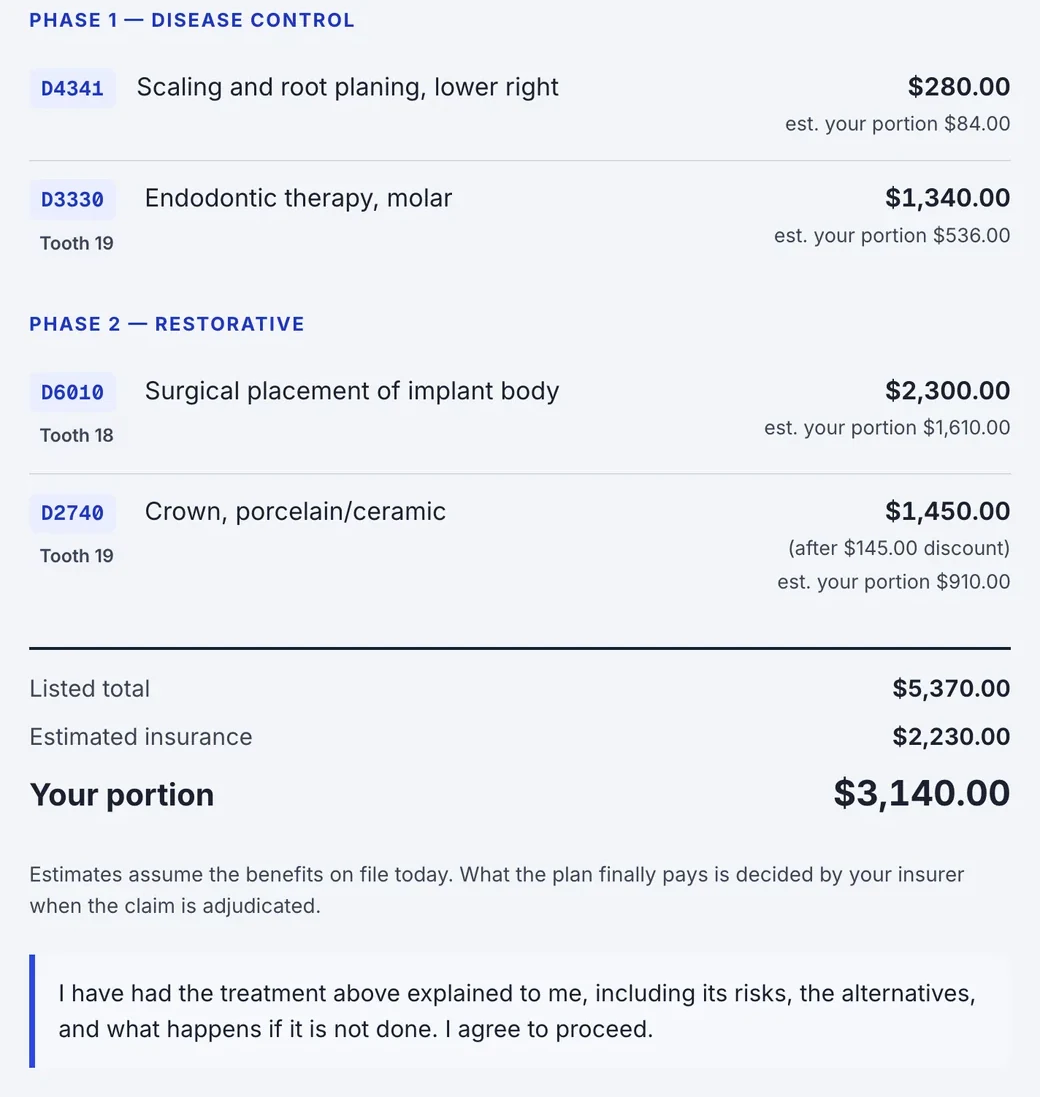
Phased, CDT-coded plans with alternatives side by side and the choice recorded. Plan, consents and deposit are signed in one session, and every plan sits on a case-acceptance board.

Sign the note. The superbill is made.

Signing issues the superbill from the note's codes and files the visit summary. Per-procedure eligibility, dental 837D claims, a real ledger and checkout.

The product

Real screens, invented patients.

clinical.dionhealth.com/app/patients/…/chart
The tooth chart, with findings and planned treatment drawn on the arch

Charting & perio

Findings and planned treatment, on the arch.

Charting, perio and the treatment history share one tooth-level record, so the chart you see is the chart everyone sees.

clinical.dionhealth.com/app · Dion AI
The Dion AI panel: one sentence becomes a plan item, a follow-up and a referral letter, each with a Do it button

Dion AI

One sentence, three cards, one tap each.

A follow-up joins the waitlist — it never books a chair by itself — and nothing is sent to a patient without someone tapping send.

clinical.dionhealth.com/app/patients/…/plans
The phased treatment plan a patient reads and signs, with fees and the estimated portion

Treatment plans

The plan the patient reads and signs.

Phases, fees and the estimated patient portion, signed with its consents and deposit in the same session.

clinical.dionhealth.com/app/schedule
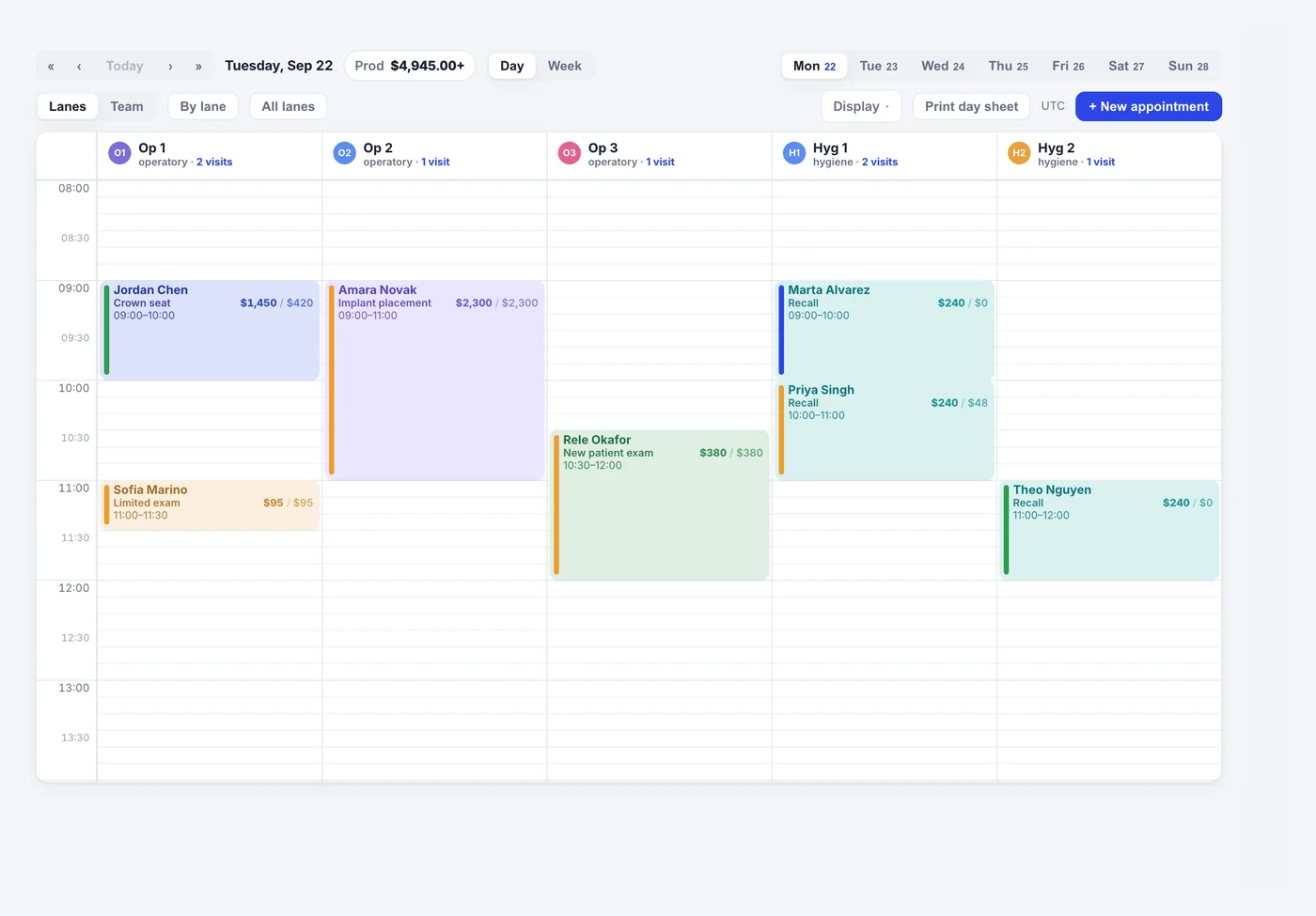
The schedule board — lanes, visit types by colour, and production on every block

Schedule

Production on every block, every office.

Day, week or month; one office or all of them on one board. Each block carries its visit type, production and what to collect.

clinical.dionhealth.com/app/patients/…/imaging
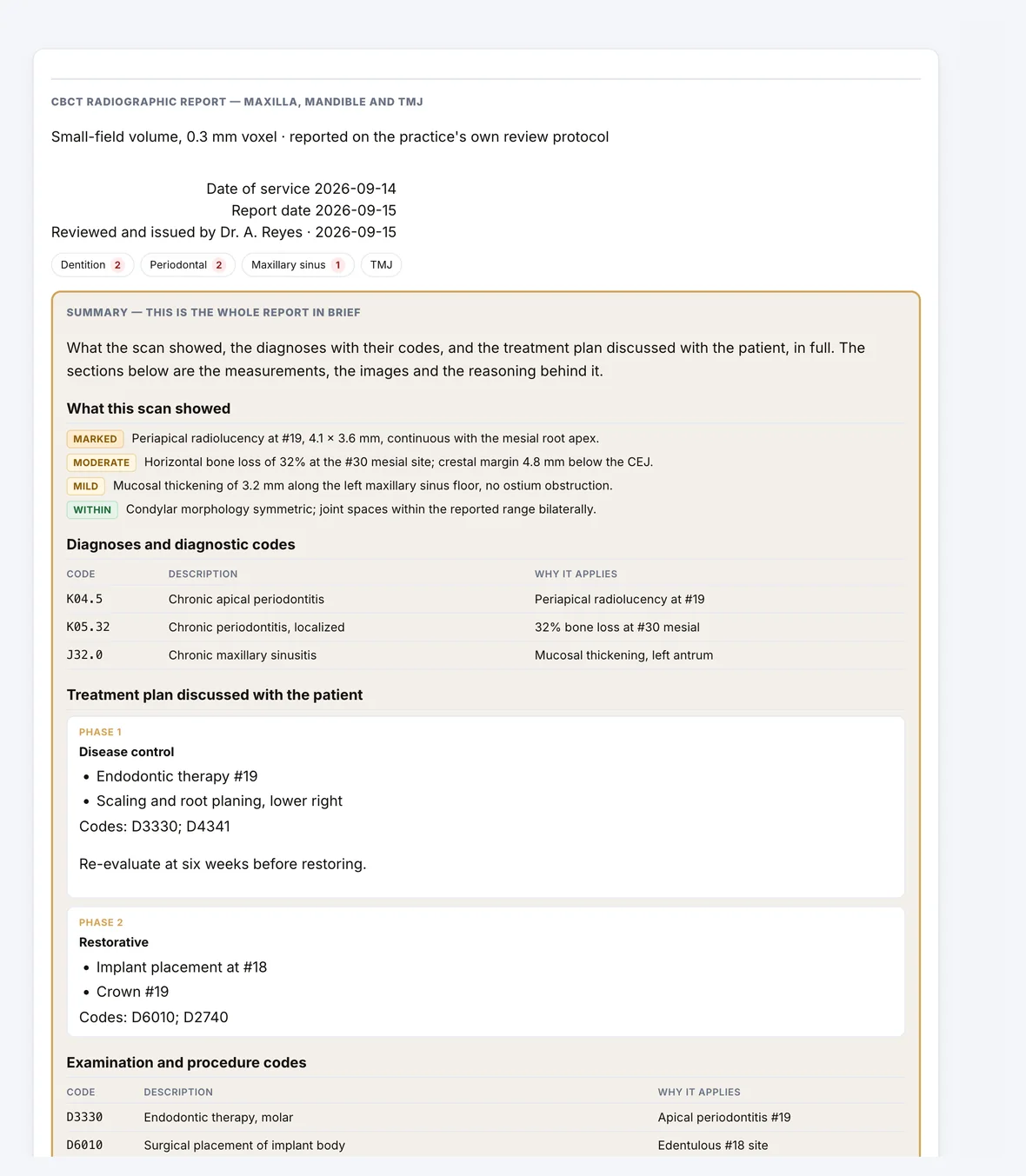
A CBCT report on the chart — measured findings, diagnostic codes and the treatment plan

Imaging & CBCT

Scans on the chart the moment they're taken.

Romexis and DS Core exports file themselves. The CBCT workspace segments, reformats, measures and exports STL; a clinician reviews and issues the report.

clinical.dionhealth.com/app/patients/…/financial
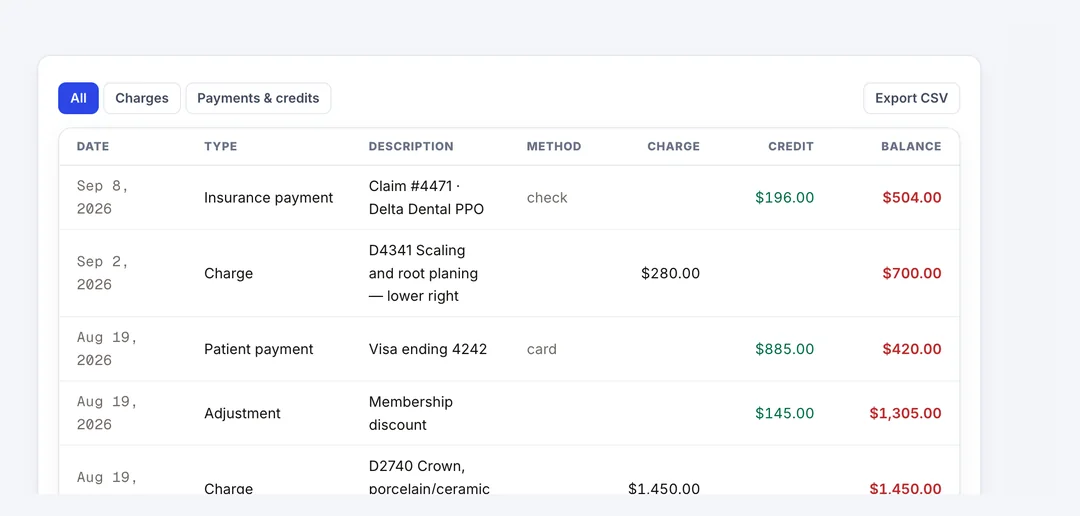
The patient ledger — charges, adjustments, payments and a running balance

Ledger

Charges, payments and a running balance.

Insurance and patient payments post to one ledger per patient, with the claim that paid them.

How it works

From application to your whole team.

01

Apply your practice

An owner submits the practice's EIN, NPIs and state license. An onboarding agent collects the rest in a short conversation.

02

Get approved

Dion verifies the credentials and approves the practice. Your workspace, owner profile and first location are set up automatically.

03

Bring your team and your data

Each teammate joins by email invite into onboarding shaped to their role. Your records are imported and the old system runs alongside until you switch.

For dentists & hygienists

Chairside, in one record.

Odontogram, perio, the scribe and the plan on the same chart. Assistants record for the doctor; only the author signs, and a signed note is addended, never deleted.

For owners & the front office

Every office, one board.

Read offices separately or together, with production and what to collect on every block. Forms go out at booking and remind themselves. We import from CareStack or Open Dental and run both systems side by side until your team signs off.

Part of the Dion suite — reminders, payments, claims and lab cases live in their own Dion products and stay in step with the chart.

One record for the whole practice. Apply to bring yours.

Practices join by application. Start with your own numbers, or apply now.

Guardrails, built in.

Audit log on every PHI change and read
MFA · per-practice data isolation
Signed notes are addended, never deleted
The AI proposes; a person commits